

In previous blog posts, I discussed Microservices and Docker. After understanding the basics, this article will feel more complete as we dive into the popular "trio" in the cloud-native world: Kubernetes, Argo CD, and Istio.
These three tools are crucial in a production environment. If you want to upgrade your skills from "just a programmer" to an engineer with a DevOps mindset, understanding these concepts is a must.
☸️ What is Kubernetes? (The Orchestrator)
If Docker is about how we package applications into containers, then Kubernetes (K8s) is about how we manage thousands of those containers automatically.
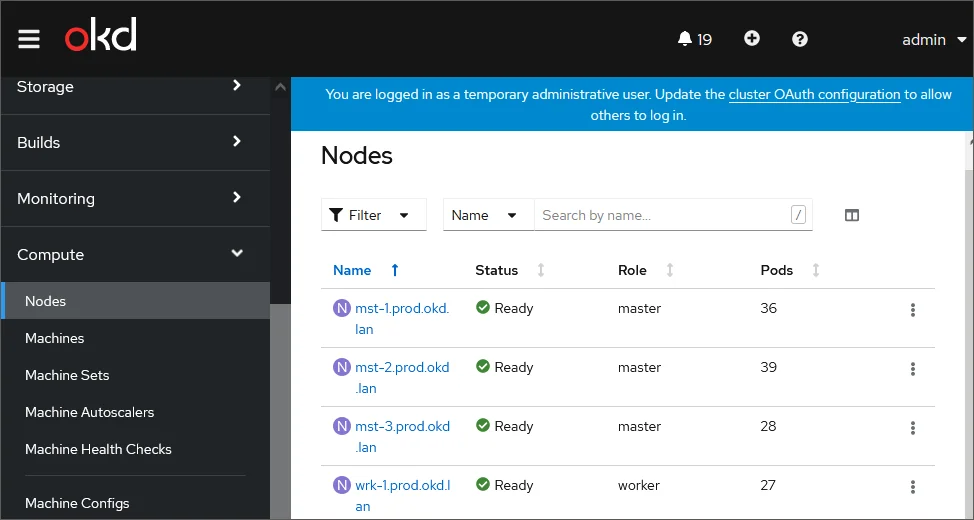
OKD (OpenShift) Nodes - Source: Help Fsight
Imagine you have 100 containers running. What happens if one container dies? What happens if traffic suddenly spikes? Without Kubernetes, you would have to perform manual scaling and maintenance one by one.
Kubernetes helps us with:
- Self-healing: If a container crashes, K8s automatically restarts it.
- Auto-scaling: Automatically adding or removing containers based on traffic load.
- Service Discovery: Making it easy for applications to communicate with each other without needing to know individual IP addresses.
Simply put: If containers are the musicians, Kubernetes is the conductor of the orchestra.
Why not just use Docker Compose?
You might be thinking what I thought when I first started: "If we already have Docker Compose, isn't that enough?"
Docker Compose is excellent for running multi-container applications on a single machine (usually on our local laptops during development). However, in a real production environment, we deal with many servers (clusters). Kubernetes is designed to manage containers across multiple servers simultaneously, handling hardware failures and automatic load distribution that standard Docker Compose cannot handle.
Furthermore, Docker Compose lacks native Self-Healing, Auto-Scaling, and advanced Service Discovery. If it goes down, it stays down.
What is Argo CD? (The GitOps Way)
Argo CD is a Continuous Delivery (CD) tool that follows GitOps principles.
Without Argo CD, the deployment process is usually manual or involves complex scripts:
- Build Docker Image.
- Push to Image Registry.
- SSH into the server or manually run
kubectl apply -f manual-config.yaml.
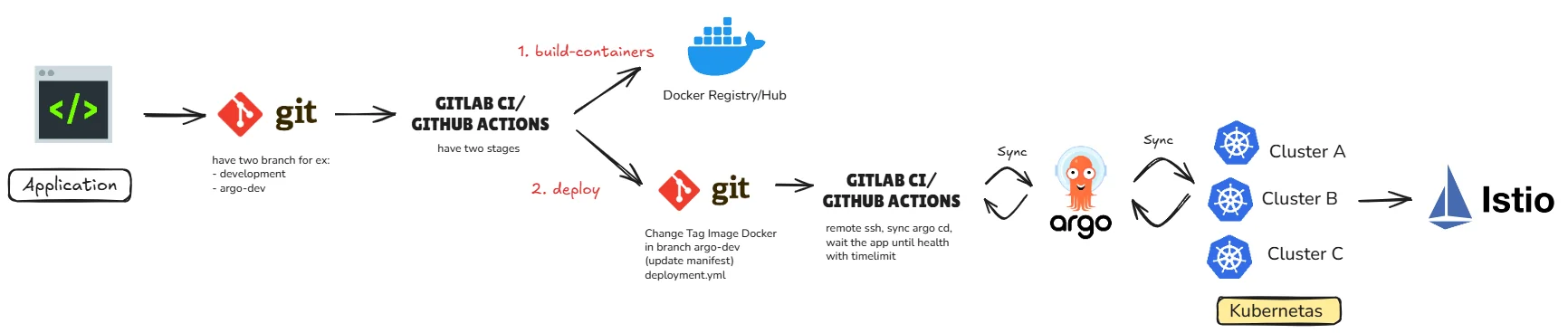
With Argo CD, Git becomes the Single Source of Truth. You only need to push configuration changes to your Git repository, and Argo CD will automatically detect those changes and synchronize them to your Kubernetes cluster.

Source: Itgix
Why do programmers love Argo CD?
- Transparency: Everyone can see what is currently running in the cluster via the Argo CD UI.
- Easy Rollback: Did a deployment go wrong? Just revert the commit in Git, and the application will automatically return to the previous version.
What is Istio? (The Service Mesh)
Once our applications are running on Kubernetes and deployed via Argo CD, new challenges arise: How do we secure communication between services? How do we split traffic (A/B Testing)?
This is where Istio comes in as a Service Mesh. Istio adds a control layer on top of your Kubernetes cluster without requiring any changes to your application code.
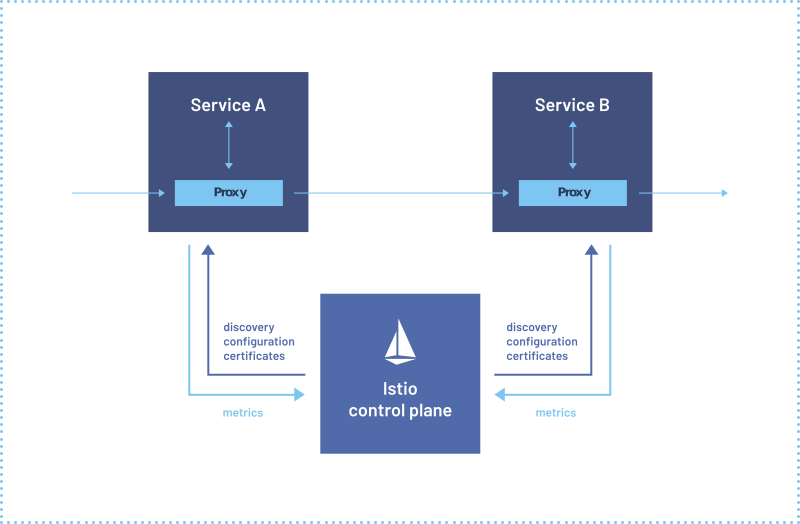
Source: Istio
Key features of Istio:
- Traffic Management: You can route 10% of traffic to a new version of the app (Canary Deployment).
- Security: Automatically encrypts communication between services (mTLS).
- Observability: Provides visualizations of how traffic flows between your microservices (usually paired with Kiali).
Real-World Implementation Example (Golang)
Based on the architecture diagram above, let's look at how we actually implement this. We will use a simple Golang application.
1. The Application (main.go)
First, we create a simple web server in Golang.
package main

import (
	"fmt"
	"net/http"
	"os"
)

func main() {
	http.HandleFunc("/", func(w http.ResponseWriter, r *http.Request) {
		version := os.Getenv("APP_VERSION")
		if version == "" {
			version = "1.0.0"
		}
		fmt.Fprintf(w, "Hello World! Running version: %s\n", version)
	})

	fmt.Println("Server starting on port 8080...")
	http.ListenAndServe(":8080", nil)
}
2. Dockerization (Dockerfile)
We need to package our Go app into a lightweight container.
# Build stage
FROM golang:1.21-alpine AS builder
WORKDIR /app
COPY . .
RUN go build -o main .

# Run stage
FROM alpine:latest
WORKDIR /app
COPY --from=builder /app/main .
EXPOSE 8080
CMD ["./main"]
3. Kubernetes Manifest (deployment.yaml)
This is what Argo CD will watch and apply to our cluster.
apiVersion: apps/v1
kind: Deployment
metadata:
  name: golang-app
  namespace: my-apps
spec:
  replicas: 3
  selector:
    matchLabels:
      app: golang-app
  template:
    metadata:
      labels:
        app: golang-app
    spec:
      containers:
        - name: golang-app
          image: my-docker-hub/golang-app:v1.0.0 # This tag is updated by CI
          ports:
            - containerPort: 8080
          env:
            - name: APP_VERSION
              value: "v1.0.0"
---
apiVersion: v1
kind: Service
metadata:
  name: golang-app-service
  namespace: my-apps
spec:
  selector:
    app: golang-app
  ports:
    - protocol: TCP
      port: 80
      targetPort: 8080
4. GitOps with Argo CD
we use a Two-Branch strategy so when you build on step 3 make sure is in the development branch and the argo-dev branch is only for the Kubernetes YAML files.
developmentbranch: Contains the source code.argo-devbranch: Contains only the Kubernetes YAML files.
The Workflow:
- Developer pushes to
development. - GitHub Actions / GitLab CI triggers:
- Builds the Docker image.
- Pushes it to the Registry with a unique tag (e.g.,
v1.0.1). - Updates the
image:field in thedeployment.yamlinside theargo-devbranch.
- Argo CD notices the change in the
argo-devbranch. - Argo CD automatically "Syncs" the cluster to match the new Git state.
5. Routing with Istio (virtual-service.yaml)
Finally, we use Istio to manage traffic. This allows us to do things like Canary Deployments (sending only 10% of traffic to a new version).
apiVersion: networking.istio.io/v1alpha3
kind: VirtualService
metadata:
  name: golang-app-route
spec:
  hosts:
    - "golang-app.example.com"
  gateways:
    - my-gateway
  http:
    - route:
        - destination:
            host: golang-app-service
            subset: v1
          weight: 90
        - destination:
            host: golang-app-service
            subset: v2
          weight: 10
Conclusion: Why Should Programmers Care?
You might ask, "Isn't this the DevOps team's job?"
The modern world demands that programmers care more about infrastructure. By understanding Kubernetes, Argo CD, and Istio, you can:
- Debug faster because you understand how your application actually runs.
- Design application architectures that are more scalable and resilient.
- Collaborate more effectively with the infrastructure team.
So, don't just be good at writing code—start looking at how that code lives in the wild!